

















SSD vs HDD: What Is the Difference?
SSD and HDD are two different types of storage used in computers and other devices. Both can store operating systems, applications and personal files, but their technology and performance are significantly different.
What Is an HDD?
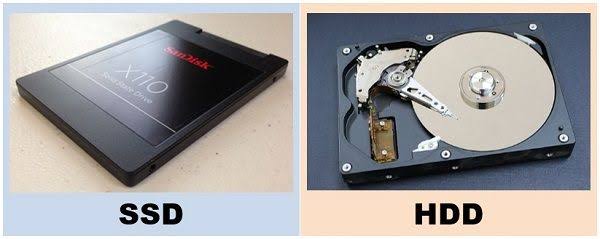
A hard disk drive, or HDD, stores information on rotating magnetic disks. A mechanical arm reads and writes data as the disks spin.
This mechanical design has been used for decades and remains useful where large storage capacity is important.
What Is an SSD?
A solid-state drive, or SSD, stores data using flash memory and has no mechanical spinning disks.
This allows SSDs to provide much faster access to data than traditional mechanical hard drives in many everyday situations.
SSD vs HDD
| Feature | SSD | HDD |
|---|---|---|
| Moving parts | No | Yes |
| Typical responsiveness | Faster | Slower |
| Noise | Silent | Can produce mechanical noise |
| Physical shock resistance | Generally better | More vulnerable to mechanical damage |
| Large-capacity storage | Available | Often attractive for high-capacity storage |
Which Is Better for a Laptop?
For most modern laptops, an SSD is the more practical choice. It can make the operating system, applications and file access feel considerably more responsive.
An SSD is also useful for portable computers because it has no spinning mechanical components.
When Does an HDD Still Make Sense?
HDDs can still be useful for large collections of files, backups and other situations where storage capacity is more important than maximum performance.
Some users combine both technologies by keeping the operating system and frequently used applications on an SSD while using a larger HDD for secondary storage.
Does an SSD Make Everything Faster?
No. An SSD improves storage-related operations, but it does not automatically make every component of a computer faster.
Processor performance, RAM, graphics hardware and software optimisation also affect overall system performance.
Final Thoughts
For a new everyday laptop, an SSD is generally the better starting point. HDDs remain useful where large amounts of storage are required at a lower cost.
The best choice ultimately depends on whether your priority is responsiveness, capacity, portability or a combination of these factors.